Sonar simulator

Practice sonar searches before you head out on a real one

Echolo is a sonar trainer for teams that search for people underwater. You run the boat over the area, tune the image, search the circle around the last known point and mark the mannequin's echo. After the mission you get a debrief and can go back on the water to every mark and every missed target.

App Store Coming soon Google Play Coming soon

or play in your browser

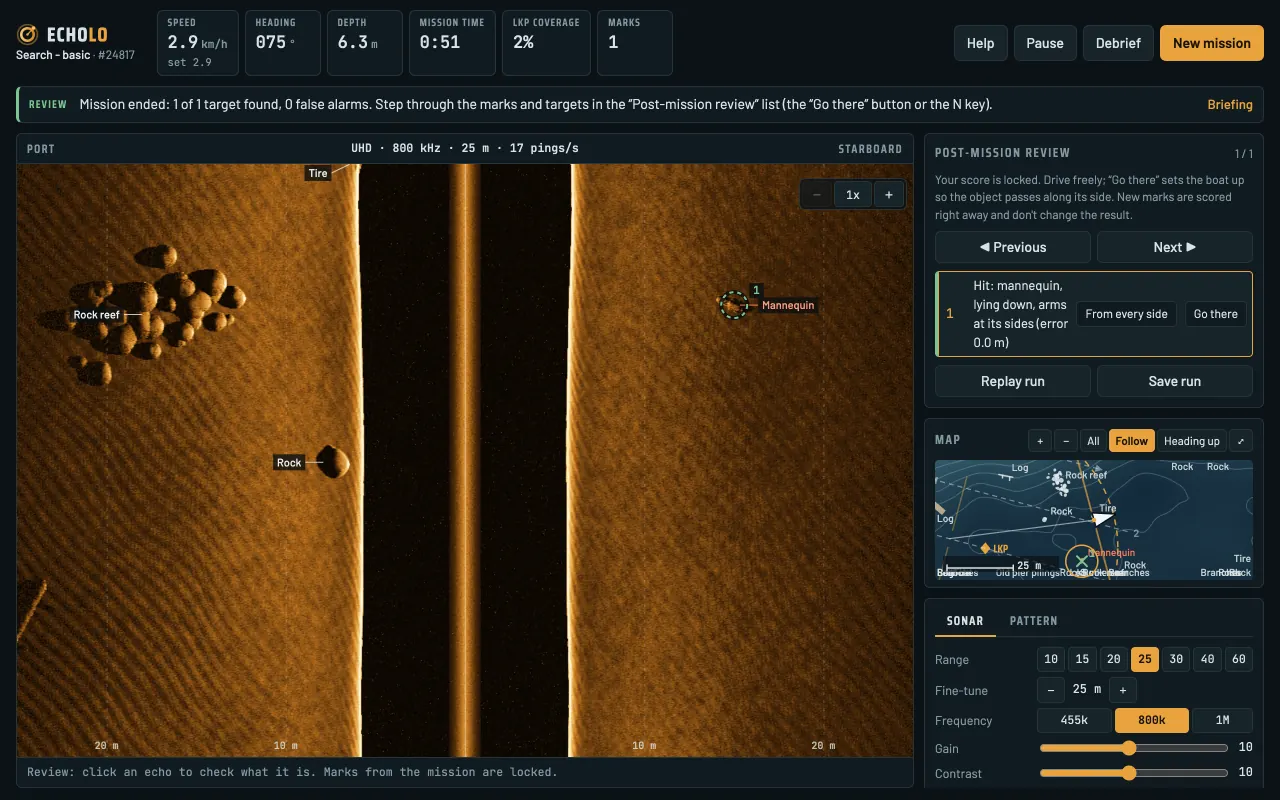
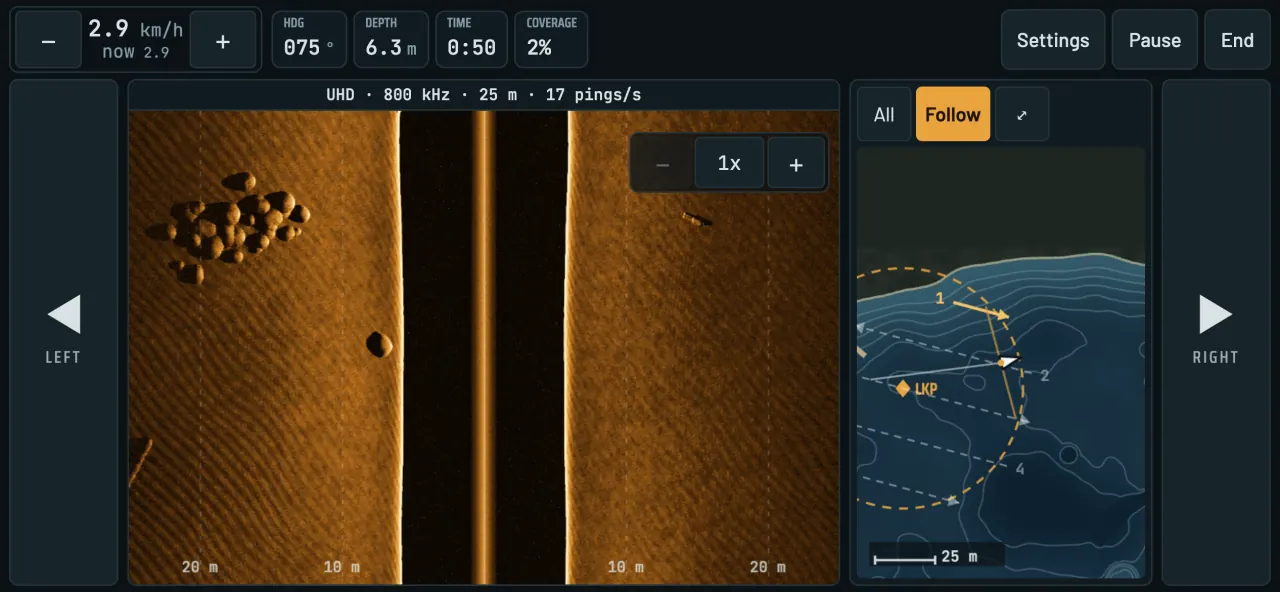
Echolo mission screen: sonar image of port and starboard with a mannequin echo on starboard, next to a map of the area with the LKP circle and search pattern lines
A real simulator screen: the “Search - basic” mission, UHD transducer, 800 kHz, 25 m range. The mannequin's echo is on the starboard side.
  • Phone, tablet and computer
  • English and Polish
  • Debrief and review after every mission

Who it's for

  • Water rescue
  • Fire departments
  • Police
  • Search teams and public safety divers
  • Dive schools and clubs

What a mission looks like

From callout to debrief in one mission

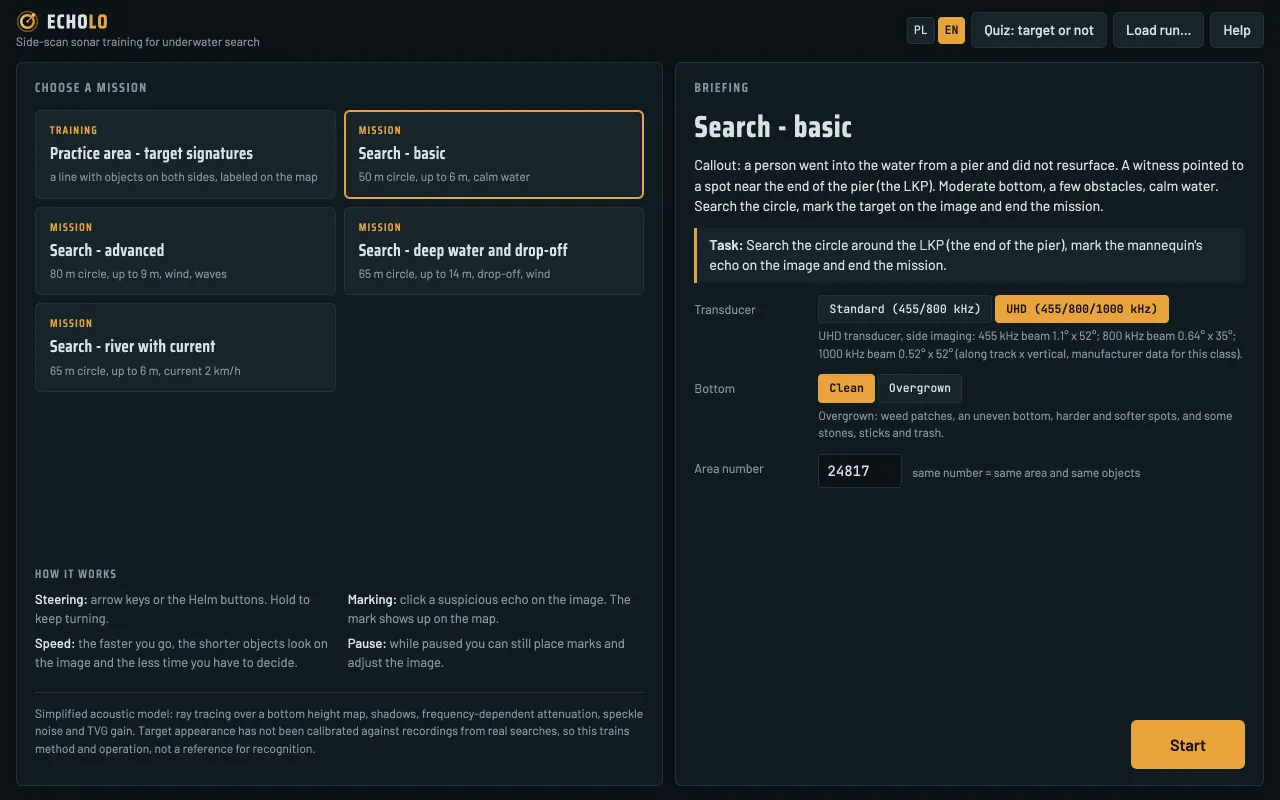
Every mission starts with a briefing: who went missing, where they were last seen, what the bottom and the water are like. From there, it's up to you.

  1. Briefing. Pick the scenario, the transducer, the bottom type and the area number.
  2. Search. Head for the LKP circle, turn on the parallel-line pattern and run the boat along the lines while you watch the image on both sides.
  3. Mark. Click or tap a suspicious echo on the image to mark it. The mark goes straight onto the map, and on the next pass from another heading you can see where it was.
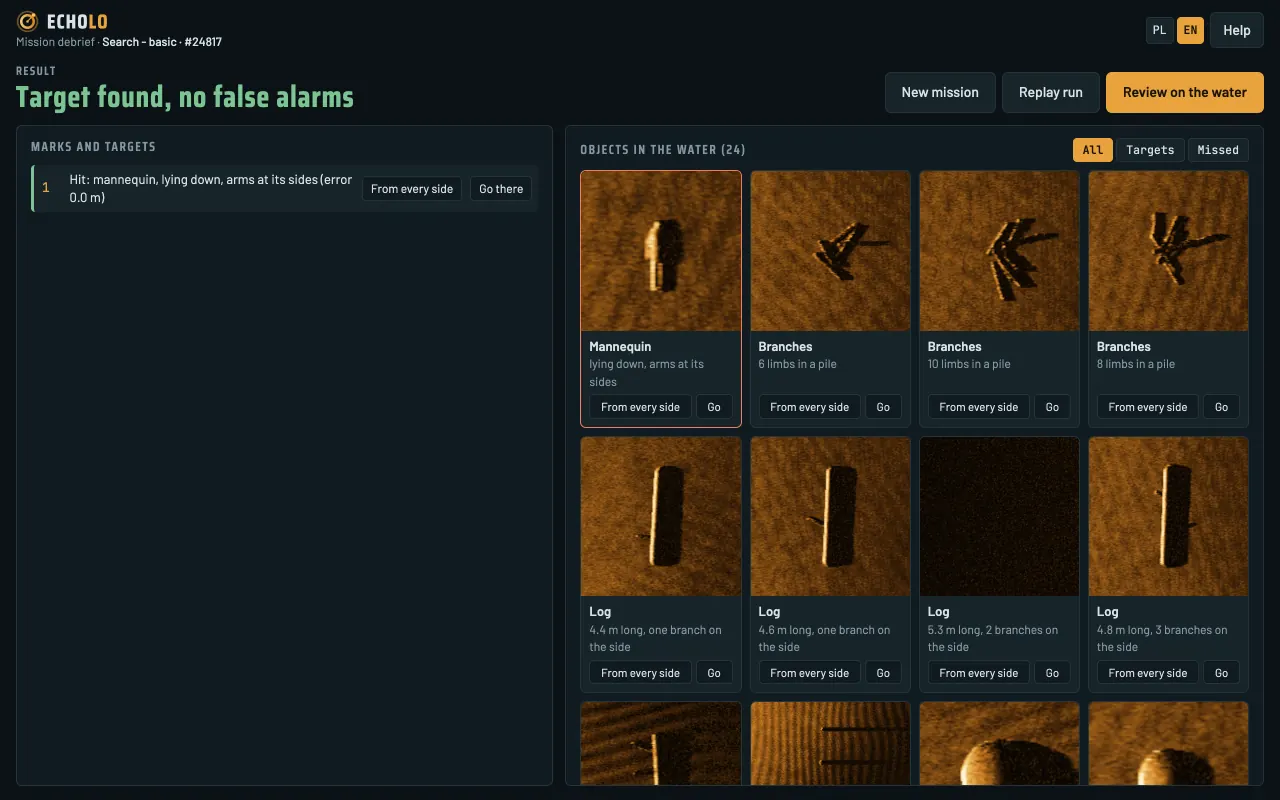
  4. Debrief and review. End the mission and see the result: hits, false alarms, position error, area coverage. Then sail to each object and check what it looked like.

What it teaches

Four skills that decide how a search ends

A simulator can't replace the water, but it lets you practice underwater search as many times as you need, on the same area or a new one every time.

Sonar settings

The simulator currently models side-scan sonar. Range, frequency, gain and contrast change the image the way they do on a real unit: a higher frequency gives a sharper image and less range, and in deep water part of the range is taken up by the water column. You see transducer ringing, the nadir gap under the boat and shadows behind objects.

Standard 455/800 kHz · UHD 455/800/1000 kHz · 10-60 m range · 6 palettes

Boat handling and search patterns

You steer the boat yourself: heading, speed, wind, waves and river current. A parallel-line pattern with recommended line spacing helps you cover the whole LKP circle, and the simulator tracks cross-track error, completed lines and area coverage.

pattern lines · spacing with swath overlap · LKP area coverage

Telling a target from trash

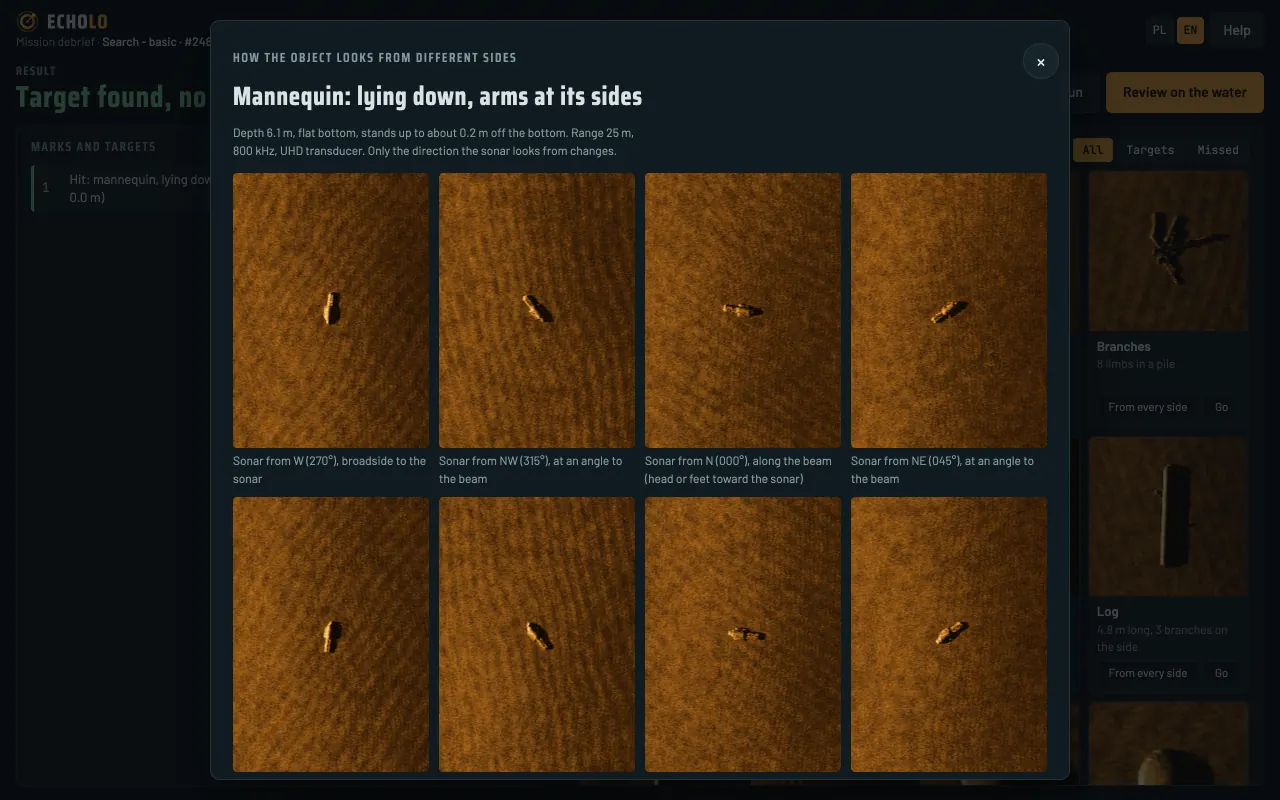
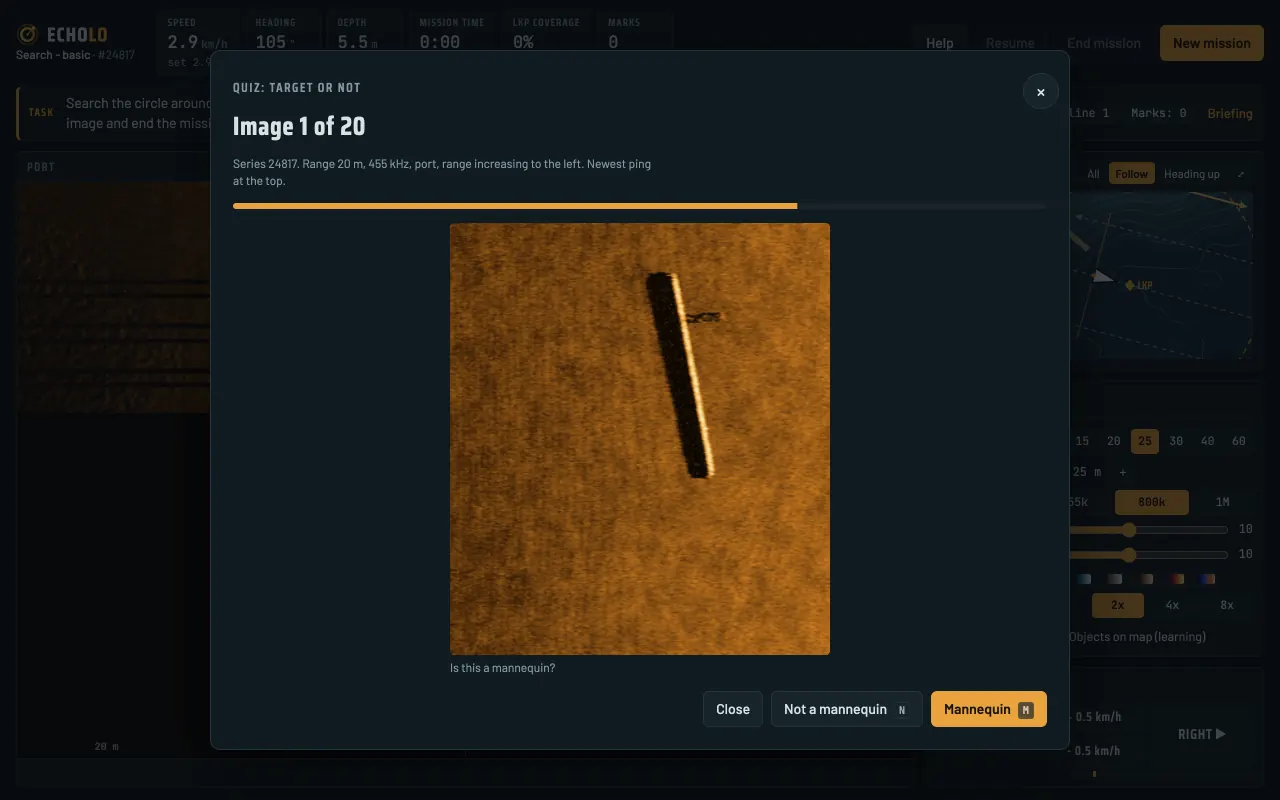
The bottom holds logs, tires, rocks, bicycles, shopping carts, branches, wrecks and cars, and the mannequin may be curled up, upright or partly buried in silt. The “target or not” quiz trains quick decisions, and viewing an object from eight directions shows why an echo is confirmed from another heading.

quiz: 20 images, 5 s per decision

Marking the target

You place a mark on the image and the simulator turns it into a position on the bottom. After the mission each mark is judged: a hit within 5 m of the target, or a false alarm with an explanation of what it was (fish in the water column, debris, noise, another object).

hits · false alarms · mean position error

Scenarios

Learning

Practice area - target signatures

A flat, sandy bottom with ten labeled objects along the track line. Run the line with different range, frequency and speed and watch how the image changes.

Mission

Search - basic

A person went into the water from a pier and didn't come up. A 50 m circle, up to 6 m deep, a few obstacles, calm water. This scenario is also the demo mission.

Mission

Search - advanced

An 80 m circle, up to 9 m deep, vegetation, lots of trash and schools of fish. Wind pushes the boat, waves rock the transducer, and the target may be partly buried in silt.

Mission

Search - deep water and drop-off

Past the shallows by the pier, the bottom falls away in a steep drop-off to 12-14 m. Match the range to the depth and check the foot of the drop-off from both sides.

Mission

Search - river with current

A current of about 2 km/h pushes the boat, so the search area lies downstream of where the person went missing. A bottom with dunes, and rock groynes with scour holes along the bank.

No boat

Quiz: target or not

Twenty images and 5 seconds per decision. A missed mannequin costs two points, a false alarm one, and after the series you see every mistake with a hint.

Every scenario can be played on a clean or overgrown bottom. The area number sets the bottom shape and the position of the mannequin and debris: an instructor can give a group one number and compare the runs afterwards.
After the mission

A debrief that tells you what went wrong

The result is more than “found” or “not found”. The simulator shows how much of the area went unseen, whether the line spacing was too wide, whether the target lay in the nadir gap under the boat, and lets you go back on the water to see it for yourself.

How it works

Phone, tablet or computer

  • An app for phone and tablet. Echolo for iOS and Android: the sonar image across the full screen width, large helm buttons and marks placed with a tap on the image.
  • Computer. On a computer you play in the browser. The arrow keys steer the boat and set the speed, the space bar pauses the mission, and shortcuts zoom the map and the sonar image.
  • One account everywhere. Sign in with the same account on every device, and your plan and results come with you.
  • Two languages. The whole simulator and the account panel are in English and Polish, and you switch with one button.
Echolo on a phone: sonar image in the middle, large helm buttons on both sides, speed, heading, depth, time and coverage along the top, map on the right
The same mission on a phone.

For organizations

One account for the whole unit

Invite your people, let everyone train at their own pace, and see how they're doing.

The whole team

Invite people by email, many at once. One person can belong to several organizations.

Results and runs

Every mission result stays on the account. Admins see members' results and replay their runs to go over them with the team.

Challenges

Any member can challenge the rest. Everyone sails the same area, which nobody knows beforehand, and gets one attempt.

Ranking

Places in challenges earn points like in a World Cup. Only members of the organization see the ranking, and it runs in seasons.

Individual account

Train on your own, at your own pace: the Personal plan gives you every scenario and the quiz. You can join an organization or create your own at any time.

Plans

A plan for 6 or 12 months

Your account is free. A plan unlocks every simulator scenario and the quiz for 6 or 12 months.

No plan needed

Demo

Free

  • one mission: “Search - basic” on a fixed area, as many runs as you like
  • mission debrief and review on the water
  • an organization without a plan has 3 seats including the admin, and everyone plays the demo
Sign up

For one person

Personal

12 months
€65net
6 months
€39net
  • every scenario and the quiz
  • individual account, one person
  • 6 or 12 months
Sign up

For organizations

Team

Size12 months6 months
up to 10 people€255net€149net
up to 25 people€489net€289net
up to 50 people€809net€489net
over 50 peopleprice on request
  • every scenario and the quiz for everyone in the organization
  • 6 or 12 months, one price for the whole team
Ask for a quote

Prices in euros, excluding VAT. VAT depends on the buyer's country: an EU business with an EU VAT number confirmed in VIES pays the net amount (reverse charge), buyers outside the EU pay no Polish VAT, and other EU buyers, including consumers, pay VAT as described in the Terms (§ 5).

FAQ

Frequently asked questions

What does Echolo run on?

Phones and tablets with iOS and Android, and computers in a browser (a current version of Chrome, Edge, Safari or Firefox).

Is there a free demo?

Yes. Once you create an account you can play one mission, “Search - basic”, free and as many times as you like, with the debrief and the review afterwards. No payment details needed.

Can I train on a phone?

Yes, in landscape. The sonar image needs the width, and the helm buttons then sit under your thumbs. It's most comfortable on a screen of 7 inches or more, such as a tablet or a larger phone.

Are results saved to my account?

Yes. The result and the run of every mission stay on your account. In an organization the admin sees members' results and runs, and every member sees their own results and the ranking.

How many people can an organization have?

Without a plan, 3 people including the admin. The Team plan comes in three sizes: up to 10, up to 25 and up to 50 people; for larger organizations we'll prepare a custom quote.

Does Echolo collect data for ads or analytics?

No. The service has no ads and no third-party analytics, and this page doesn't use cookies. Details are in the privacy policy.

Head out on your first mission

Create an account and train on your phone, tablet or computer, and ask about a plan for your unit when you're ready.

App Store Coming soon Google Play Coming soon

or play in your browser

contact@echolo.app